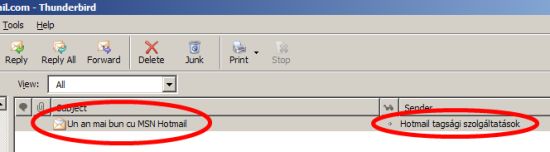
Niciodata nu este prea tarziu sa trimiti o urare de anul nou, si-a zis Hotmail atunci cand a decis sa trimita utilizatorilor sai (inclusiv mie) un email de promovare a produselor Hotmail, Messenger si Windows Vista, pe data de 10 februarie. Cireasa pe tort, continutul emailului este localizat in limba romana, ceea ce nu poate decat sa faca placere - ce poate fi mai elegant decat sa trimiti spam direct marketing email in limba natala a celui care il va citi ?
Ideal ar fi fost daca ar fi scris si numele expeditorului in romana, nu in maghiara.
Taguri:
Microsoft,
Hotmail,
I18N
De la vizita lui Bill Gates, romanii au prins un drag fantastic de Microsoft. Ce-a zis Basescu, are n-are dreptate, ce minunati sunt Microsoft cu softurile ei si ce diabolici sunt cei de la Microsoft ca impiedica Linuxul care r0×0rZ sa se desfasoare la adevarata valoare a kernelului lui cel mirobolant. Ma rog… Vine insa cate un reporter agil care de dragul de a mai scrie ceva/orice despre Microsoft ne serveste cate o gogonata de numa-numa.
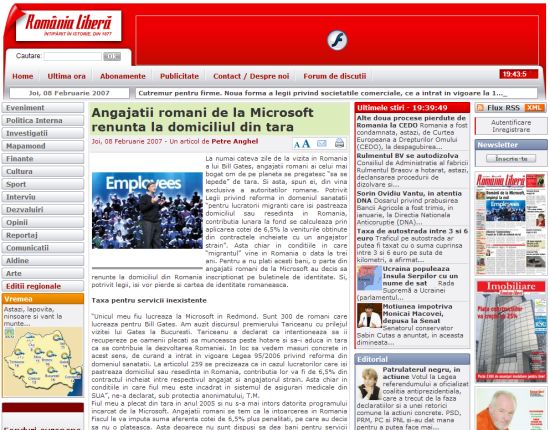
Bunaoara, in Romania Libera apare un articol “bomba” care ne anunta, nici mai mult nici mai putin, ca “Angajatii romani de la Microsoft renunta la domiciliul din tara“. In fapt, este vorba de faimoasa lege 95/2006 prin care romanii care lucreaza in strainatate in afara UE sunt obligati sa plateasca statului roman contributia CASS de 6.5% din salariu. Legea poate fi interpretata in sensul in care aceasta contributie se plateste indiferent daca angajatul cotizeaza sau nu la o asigurare de sanatate in tara pe teritoriul careia lucreaza. Desi legea priveste o sumedenie de romani, autorul articolului se simte obligat sa mentioneze Microsoft, pentru ca intamplator persoana care i-a dat pontul este angajat Microsoft. Nonsalant, el ne serveste la fileu informatia ca 120 de angajati romani de la Microsoft se pregatesc sa renunte la domiciliu si in curand la cetatenia patriei mume.
Intra pe fir Eduard Koller, un domn de origine romana care lucreaza la Microsoft. Usor ofuscat, acesta ne spune pe blogul lui ca in presa sunt minciuni si nici vorba de o asemenea miscare de masa in randul romanilor ce lucreaza in campusul de langa Seattle. Interesante sunt comentariile de pe RL, apare cate un mare patriot care se enerveaza ca informaticienii romani s-au format moca la fantastica scoala romaneasca si au plecat sa-l imbogateasca pe canadianul ala nenorocit de Bill Gates. Dumnezeu sa-i deznoade.
Desigur ca exista o solutie mai simpla, de la Tariceanu graire. Sa se intoarca toti la Bucuresti si sa se angajeze la centrul de suport global al Microsoft.
Taguri:
Microsoft,
presa,
fake
1. Legenda care circula pe Internet este ca “masele de utilizatori” pot sa faca orice. Pot sa scrie stiri, sa redacteze enciclopedii, sa cante prost, sa filmeze tampenii, sa se imbratiseze in public si sa piarda vremea cu o mare varietate de porcarii. Tot acest haos debil poarta numele de social networking. Ei bine, in loc sa fie agasati de fenomen ca orice om normal, interesantii de la Penguin Books au decis ca internautii sunt capabili sa scrie o carte impreuna, pe o instanta de Mediawiki numita A Million Penguins. Fara o linie directoare si fara moderare, rezultatul este un text incoerent, plictisitor si pe alocuri vulgar. In curand “cartea” va fi inundata de spam, ca orice wiki lasat nesupravegheat. Bine ati venit in minunata lume a experimentelor web ratate…
2. Pleaca doi rechinasi mai maricei de la Microsoft. La nivelul lor nu se poate sti foarte clar daca este o demisie voluntara, mazilire sau pensie pe caz de sictir. Cert este ca in cazul lui Brian Lee, corporate VP la divizia de entertainment Microsoft si responsabil de dezastrul “enormul succes” al playerului Microsoft Zune, e posibil sa fi fost si un pliculet rozaliu dar gros la mijloc. In locul lui Brian Lee vine domnul J Allard (asa are numele “pe buletin” !), una dintre figurile cele mai percutante ale noului val de manageri din Microsoft. Arhitect software de talent convertit in manager, J este autorul unui memo, in 1995, in care ii avertiza prieteneste pe colegii sai de la Microsoft ca Internetul va deveni o treaba importanta in care ar trebui sa se implice cat mai repede. J a supervizat atat designul cat si implementarea primei console Xbox, apoi Xbox 306 cat si lucrul la site-ul Xbox Live. El a fost implicat doar partial in dezvoltarea Zune, dar acum ca i s-au dat fraiele poate reuseste sa scoata Zune din groapa comuna a gadgeturilor esuate. Iata-l pe Allard, o figura oarecum atipica in managementul Microsoft:

Al doilea pe lista plecarilor de la Redmond este domnul James Allchin, care a condus dezvoltarea mai multor sisteme de operare printre care Windows Viiii[aplauze, ropote de tobe, trompete, tribunele muge]iiiiiiiiistaaaaaa ! Nici n-a apucat sa lanseze bine nava la apa, capitanul s-a urcat intr-o salupa si a tulit-o spre tarmul inverzit. James se plictiseste cumplit de a ajuns sa povesteasca pe blog despre cerealele de la micul dejun si ora la care isi aduce copiii de la scoala. Inca nu este clar cine ii va lua locul, si nici daca Allchin are in sfarsit voie sa-si cumpere un Mac. Cert e ca Ballmer si-a mai scrijelit un omulet pe capota masinii de concediat.
3. ZonTube este un mash-up intre Amazon si YouTube. Site-ul facut pe calapod web 2.0 iti permite sa cauti pe YouTube clipuri pentru melodiile formatiei preferate, selectate cu ajutorul CD-urilor de pe Amazon. Modelul lor de business este incasarea de comisioane de pe urma celor care cumpara muzica de pe Amazon. Nasol. Asa cum este conceput acum site-ul, este o excelenta unealta de a gasi clipuri (oficiale, live, tv shows, bootleg-uri sau fanwork) pentru muzica pe care o ai deja, pe care o stii deja. Nu si pentru a descoperi - si eventual cumpara - muzica noua. By the way. Gomez este o trupa pas mal:

Taguri:
weekend,
Microsoft,
Zune,
YouTube,
Amazon
Remarca presedintelui Traian Basescu cum ca Microsoft Office a fost softul cel mai piratat in Romania in anii ‘90 dar din acest motiv multi romani s-au putut familiariza cu computerele - in acest fel manifestandu-si prietenia fata de Microsoft si aprecierea fata de software-ul produs de firma din Redmond - nu putea sa treaca neobservata de mass-media internationala. Asemenea subiecte si argumente sunt in general tabu in prezenta lui Gates si afirmatia a fost un faux pas din partea lui Basescu.
Iata ce a retinut Washinghton Post (stirea preluata de pe Reuters o sa faca inconjurul lumii astazi):
“Piracy worked for us, Romania president tells Gates
Pirated Microsoft Corp software helped Romania to build a vibrant technology industry, Romanian President Traian Basescu told the company’s co-founder Bill Gates on Thursday. […]
It helped Romanians improve their creative capacity in the IT industry, which has become famous around the world … Ten years ago, it was an investment in Romania’s friendship with Microsoft and with Bill Gates.
Gates made no comment.“
Ce comentariu era sa faca omul ? Sa-si ceara banii cuveniti, acum ca romanii au ajuns barosani ? Taxa pe Office ?
The Inquirer au un comentariu foarte iute:
“Romania introduced anti-piracy legislation 10 years ago but only tends to make arrests when it has to make a point to the EU, or a pirate forgets to pay his bribe money to the local constabulary.“
Era cazul sa ne mai facem un pic de bacanie prin presa lumii.
Taguri:
Microsoft,
Basescu,
Office
Ma indoiesc ca lansarea Vista in Romania are o importanta capitala pentru Microsoft - caz in care oricum l-ar fi trimis si pe Ballmer care e mai comic si mai pe placul publicului, ba chiar organizau un spectacol cu trupa Simplu, plus Romica Tociu si Cornel Palade in Piata Universitatii. Nu, Gates nu are mari asteptari de la produsele MSFT pe plaiuri mioritice. El vine de fapt sa stranga mana cu Tariceanu sau cu Basescu sau cu amandoi, nu se stie prea precis, in vederea inaugurarii GTSC (Centrul Global de Suport Tehnic) de la Bucuresti.

Ori, GTSC-ul nu este o gluma. Microsoft are cateva asemenea centre pe glob, cel mai mare fiind la Bangalore, in India. Cel din Bucuresti este destinat sa gazduiasca nu mai putin de 750 300 de profesionisti. Majoritatea insa nu vor fi ingineri IT, ci agenti de call center care stiu macar o limba straina, trecuti printr-un training sumar ca sa poata da cu bifa Yes/No cand il intreaba pe apelant have you tried rebooting your PC. Cu alte cuvinte, investitia de 12 milioane de USD este destinata unui call center gigant. La cei cativa ingineri de suport adevarati pe care Microsoft este pe cale sa ii angajeze se va ajunge numai dupa ce clientul escaladeaza mai multe nivele, din care cel putin unul complet automatizat, si tot nu reuseste sa-si rezolve problema. Have you checked that your network cable is plugged ?
Microsoft nu sunt foarte originali in demersul lor. Ei vin pe o piata de call-center deja zdravan penetrata de Oracle, Genpact si HP. Ce-i drept, Oracle fac si oaresce suport “uman”, avand o buna baza de clienti si in Romania, mai fac si niscaiva QA. HP rezolva si problele legate de business, nu numai strict suport IT, exemple: urmarire de plati, reconciliere, etc. Dar Genpact ilustreaza perfect profilul angajatului pe care-l cauta aceste multinationale in Romania. Tanar, energic, de preferinta student sau proaspat absolvent, capabil sa se robotizeze si sa urmeze rapid o serie de instructiuni simple, in urma unui scurt training. Nu vad deosebiri majore intre ceea ce aceste firme cauta in Romania si ceea ce cautau in India la sfarsitul deceniului ‘90. Si nu vad de ce acest gen de posturi ar tenta pe fostii mei colegi “ramasi dincolo”, cum mai aud cate un oficial guvernamental ca ne explica domol cum “se vor intoarce creierele” inapoi la muma strabuna.
UPDATE: [cf. Hotnews] Premierul Calin Popescu Tariceanu, prezent la inaugurarea centrului, a declarat ca este un prilej pentru romanii care lucreaza pentru Microsoft in sediile din lume sa se intoarca si sa-si valorifice talentul in tara. Cine zicea ca romanii nu au simtul umorului ?
Taguri:
Microsoft,
hr
Un articol ceva mai vechi, dar interesant. Despre istoria XMLHTTP, care sta la baza a ceea ce cunoastem azi sub numele de Ajax, ne povesteste Alex Hoppman, care a fost unul dintre programatorii acestei functionalitati din Javascript. Originea XMLHTTP se gaseste in Outlook Web Access pentru Exchange 2000, serverul de mail (+ altele) comercializat de Microsoft.
Interesanta povestea cum a ajuns componenta de XMLHTTP pana in Internet Explorer 5. Mai departe, stim…
Taguri:
web,
Ajax,
Microsoft